Change of address and utilities: who to notify when you move
Regulatory text checked .
Arrange USPS forwarding, update important senders directly, and confirm utility service at both addresses. Keep a separate completion check for each: approved forwarding, the address recorded by the organization, and the provider’s confirmed stop or active service.
Choose your situation
- Forwarding is arranged. Bank and agency records still need attention. Update important accounts directly and check their recorded addresses.
- Online USPS verification failed. Take the emailed barcode instructions and acceptable photo ID to a Post Office. Check the unresolved-verification steps.
- You need power and internet on arrival. Contact the actual providers and ask about activation and installation. Confirm dates before arrival.
- Your provider changes, or both homes need service. Arrange separate stop/start requests or confirm an overlap. Check the service territory first.
- You are worried about forgotten accounts. Review statements and renewal emails against the who-to-notify checklist; check scheduled deliveries separately.
Change your address with USPS
Forwarding redirects eligible mail. It leaves important sender records to check directly, even where an organization separately uses address-change data.
For sensitive documents, ask the sender how it will deliver them to the corrected address; forwarding may be restricted.
Which request fits your household?
Start through the official USPS change-of-address instructions or visit a Post Office. Choose Individual for one person; Family applies when everyone covered shares the same last name and moves together. Use separate individual requests for different surnames or separate destinations.
Select permanent or temporary according to whether you will return. Check both addresses, apartment or unit numbers, and the forwarding start date.
An authorized agent changing someone else’s address must apply in person with acceptable identification and the documentation for that situation.
At a Post Office, request the Mover’s Guide, complete PS Form 3575 and give it to the associate for identity verification.
What if verification is still unresolved?
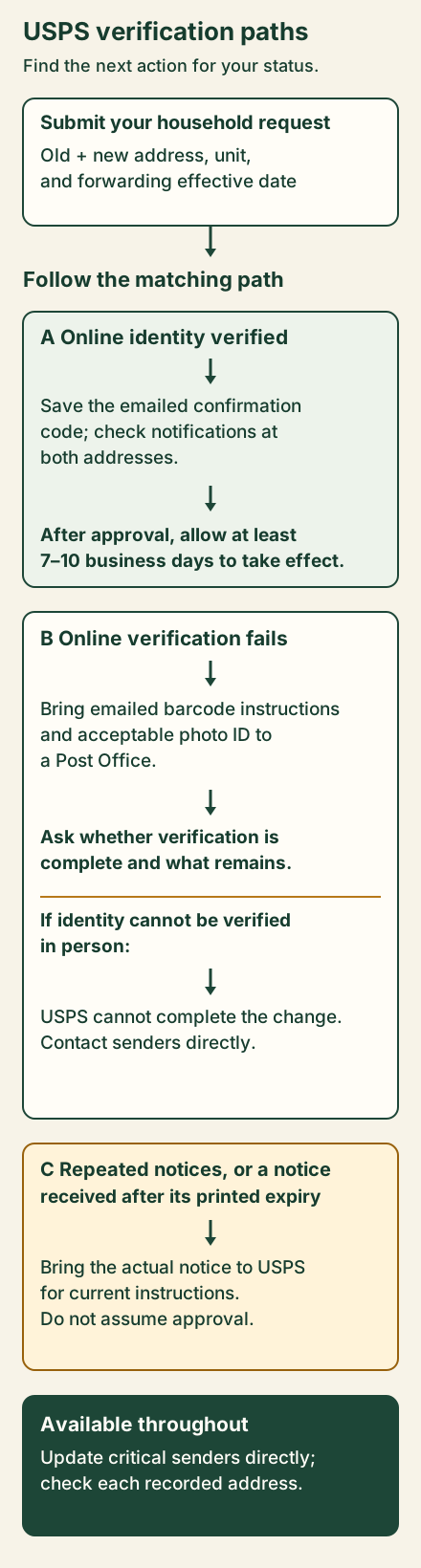
Complete identity verification. After successful online verification, save the emailed confirmation code for changes or cancellation and check notifications at both addresses.
If online verification fails, bring the emailed barcode instructions and acceptable photo ID to a Post Office. Ask whether verification is complete and what remains. Follow the path matching your current status below.
Government and financial records to update
Check federal taxes, Social Security or VA benefits you receive, applicable immigration matters, voter registration and motor-vehicle records. Use USAGov’s agency links and your relevant state authorities for their procedures and deadlines.
How should you notify the IRS?
USPS address-change data may update IRS records, but the IRS still advises direct notification because not all post offices forward government checks.
The IRS accepts several update methods: Form 8822, your new address on a tax return, a signed statement, or oral notification with identity verification. Form 8822 is one option.
A signed statement needs your full name, old/new addresses and SSN, ITIN or EIN; send it to the filing address specified by the IRS. Have those details ready for oral notification, too.
Joint filers still living together should both provide names, SSNs, the new address and signatures on the form or statement. If now living separately, each should notify the IRS. Representatives need the required power of attorney; unauthorized third parties cannot make the change.
When is a separate USCIS update required?
USPS does not update USCIS records or forward USCIS mail. For noncitizens in the United States required to register under INA 262, except INA 263(b) exemptions, 8 CFR 265.1 requires reporting each address change “within 10 days of such change,” following USCIS instructions.
Most people can use E-COA in their USCIS online account, entering receipt numbers for every pending benefit request. First check USCIS’s specific-population procedures: VAWA/T/U cases and I-751 abuse waivers have special routes.
The online account route can also apply when the original benefit request was filed by mail. Check that each pending receipt number is included.
Which financial and insurance accounts need checks?
Update banks, cards, loans, investments, payroll and retirement accounts. Verify the address actually recorded by each institution.
Transferring or starting utilities
Identify who handles electricity, gas, water/sewer, trash, internet and any home security service. Ask the landlord or property contact which accounts you arrange independently.
Can you transfer service?
Check providers for the exact new address and unit. If the same provider serves it, ask about Move/Transfer. Otherwise, arrange an old-provider stop and new-provider start separately. FPL’s service-order guidance illustrates this territory distinction. Confirm both requests and any needed overlap.
Which dates should you request?
Contact providers once your service dates are known. Ask about processing time and appointment availability; distinguish requested dates from dates they accept.
Keep old service available for moving and cleanup, coordinated with lease or closing responsibilities. FirstEnergy warns that shutoff could occur in the morning of the selected stop date. Ask your provider about timing before relying on power that day.
Request overlap if both addresses need service. Confirm the arrangement rather than automatically adding a day.
What information and access are needed?
Prepare the account number, holder/contact details, exact old/new service addresses and units, requested stop/start dates, and final billing address. The mailing destination may differ from the service location.
Submit sensitive identification only through the provider’s official process.
Ask about any deposit, technician visit, meter/property access or remaining setup condition. Record who must act before connection. Use the worksheet to keep requested dates separate from the provider’s confirmed dates.

Does internet need its own appointment?
Ask whether the address supports self-install or requires a technician and equipment delivery. Reserve the appropriate slot before arrival if you need connectivity then.
If the offered appointment falls after arrival, keep that gap visible in your tracker and ask the provider which setup options are available for the address.
How do you know service is active?
Compare the confirmation against the account holder, addresses and requested dates. Save its reference; update the provider if moving dates change.
An order receipt leaves connection to verify. FPL describes an order-confirmation email followed by another email when connected. Ask your provider how it confirms active service and follow up on outstanding conditions.
If dates or status remain unclear, send this through the official account/contact route:
Please confirm the stop date for [old service address and unit]
and the start date for [new service address and unit].
I need old-address service through [last date/time needed].
Does this require different stop scheduling or an overlap?
Is new service scheduled or already active?
What installation, access, identification or deposit steps remain?
Where will you send the final bill?
Check whether the reply accepts both dates and identifies any remaining action. Keep the old-account task open until you review its final bill.
Subscriptions, deliveries and memberships
Check billing and saved shipping addresses separately. Then inspect the destination on each already placed order and the next recurring shipment.
A saved-address edit does not establish that an existing order changed. If it still shows the old destination, ask the seller about that specific shipment.
For local gyms, clubs or library memberships, confirm the applicable update, transfer or cancellation with the provider. Record outstanding steps.
A who-to-notify checklist
Copy the applicable groups into your tracker, with one row per organization or service.
| Account group | Include what you hold |
|---|---|
| Postal | USPS forwarding; USPS.com profile and billing details |
| Government | Taxes; benefits received; applicable immigration; voter and motor-vehicle records |
| Work and money | Employer/payroll; retirement; banks, cards, loans and investments |
| Insurance | Health, auto, renters, home and life policies |
| Care and education | Doctors, dentists, pharmacies, schools and daycare |
| Household services | Electricity, gas, water/sewer, trash, internet, mobile and security |
| Shopping and memberships | Online stores, recurring deliveries, clubs, gym and library |
| Transport and personal | Toll, parking, transit; vets, pet microchips; friends and family |
For each row, record the update needed, effective date where relevant, status, confirmation or account-record check, and next unresolved action.
For utilities, retain requested and confirmed dates separately. For deliveries, record the destination checked on the specific order.
Use To do, Submitted or scheduled, Confirmed complete, Needs follow-up or Not applicable. Compare statements, renewal emails and saved merchant addresses with the list to find omissions.
A forwarding confirmation leaves bank and USPS.com account details to check. A utility order leaves active service and final billing to confirm.
Keep the next action beside each open row.